


June 28, 2022
Hiring a bad UI/UX Design Agency: Red flags you must never overlook.
Read Full

Most stores stuck on page two have already done what the checklists told them to do. Titles have keywords in them. Alt text is filled in. A speed app is installed. They're still on page two, because the checklist treated every store's problem as the same problem, and it isn't. The useful question is which part of your specific store is actually holding you back, and which parts are just untidy.
Shopify generates your sitemap, forces HTTPS, sets baseline canonical tags, and renders mobile-responsive pages by default. The Stacc estimates this covers around 80% of what's traditionally called technical SEO. That's a genuine advantage, and it's also a trap: if everyone's store is getting the same 80% for free, the 80% is not where you're losing to competitors. You're losing in the 20%, and that 20% is unevenly distributed - a bad meta title costs you on every page, a missing canonical costs you on a handful.
Knowing the difference is the job. Automation also isn't the same as correctness. Shopify's canonical tags are automatic but not always right for your internal linking pattern, which is a problem we'll come back to. Teams building a custom Shopify build from scratch should decide this ownership question before the theme is even chosen.
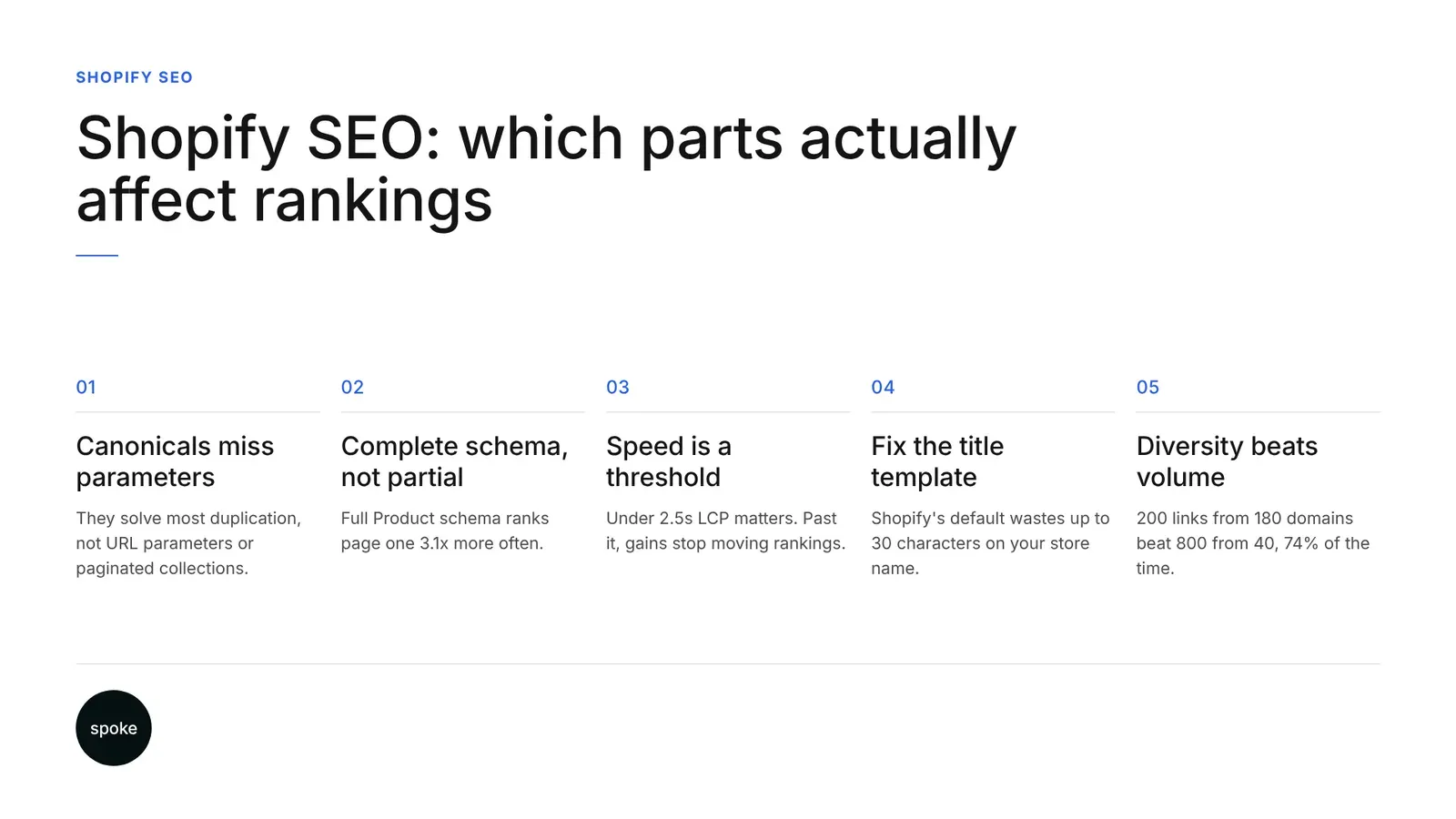
This is the highest-impact item most stores have only half-done. In an analysis of 10,000 Shopify stores across 14 verticals, 1Digital Agency found that stores with fully populated Product schema - Offer, AggregateRating and Review types all present, not just the base Product type - ranked on page one 3.1 times more often than stores without it, according to 1Digital's ranking factors study.
Most Shopify themes already output some Product schema, so the real gap isn't schema versus no schema. It's complete schema versus partial schema. A Product type with just a name and image validates fine in a testing tool and does almost nothing for you.
AggregateRating and Review fields require actual review data, which means a review collection mechanism needs to exist before schema can help - not after. Cross-check your theme's output against Schema.org's Product specification rather than assuming validation equals completeness.
This decision is worth making deliberately. A schema app costs a recurring fee, adds its own JavaScript, and keeps itself current without you touching code. Manual Liquid implementation is free and gives exact control, but it breaks silently when a theme update restructures your templates - and nobody notices until a rich result quietly disappears. If you have one developer and a slow release cycle, the app is the safer bet. If you have in-house development and a theme you're not replacing soon, manual Liquid is cheaper and more precise.
Largest Contentful Paint under 2.5 seconds on mobile was the second-strongest ranking factor in the same study, with a correlation of 0.68 - second only to schema completeness. Separately, data cited by ALM Corp puts 73% of Shopify stores below Google's recommended speed threshold. Most stores are on the wrong side of that line, which is why it's worth fixing.
What the checklists skip: once you're near the threshold, further gains stop moving anything. If your LCP sits at 4 seconds, getting to 2.3 will likely matter. If you're already at 2.6 and spend a month shaving it to 2.4, you may see nothing happen in rankings, because this behaves more like a threshold than a smooth curve. Google's Core Web Vitals guidance frames the metric the same way - as a bar to clear, not a score to maximise.
The usual causes on Shopify are theme choice, image handling and app accumulation. web.dev's Shopify performance guide covers image format and responsive variant constraints specifically. App bloat is the one that catches teams off guard: each app looks lightweight alone, but a review widget, an upsell popup and a live-chat tool stacked together can push a clean 1.2-second theme to 5 seconds, and no dashboard shows you the cumulative effect. The only reliable test is disabling apps one at a time and re-measuring, not trusting an app's own "lightweight" claim.
This is also where many stores first consider ecommerce store design services rather than another round of app-stacking.
Shopify's default title format is "Product Name - Store Name," and that suffix eats 20 to 30 characters out of a roughly 60-character budget, according to one Shopify schema audit - leaving as little as 30 characters for the product name and any keyword you want ranking. This isn't a generic "write better titles" problem. It's a specific default that most stores never override, so every product page is quietly wasting a third of its title tag on a brand name Google already knows from the domain.
Fix it once, at the template level in Liquid, rather than product by product. Doing this per-product on a catalogue of any real size is a maintenance problem waiting to happen; overriding the title output once in the theme is a ten-minute fix with permanent effect across the whole store. If your catalogue structure itself needs rework, that's usually where a custom ecommerce store rebuild gets discussed alongside the title fix.
Shopify's automatic canonical tags stop most of the obvious duplication, including the same product reachable through multiple collection paths. What they don't solve is URL parameters - sort order, filters and pagination generate URLs that fragment crawl budget even when the canonical correctly points back to the clean version. Get Ryze AI's analysis found duplicate content from improperly consolidated variants can reduce organic traffic by 15 to 30%, which is wide enough to treat as an audit priority rather than a cleanup afterthought.
The specific failure worth naming: your internal links can point to a URL your own canonical disowns. If a collection page links to a sorted or filtered version of itself - which happens constantly when a "sort by price" control sits in the template - you're sending crawl budget and link equity to a URL Google has been told to ignore.
The canonical tag resolves indexing, but it doesn't recover the wasted crawl pass or the diluted internal signal. Crawl your own site, compare where internal links actually point against the canonical each page declares, and fix the mismatches. Studios that review examples of past Shopify work usually run this exact audit before touching copy.
Self-referencing canonicals on paginated collection pages are a specific, high-consequence version of this problem. If page 2 of a collection canonicalises to itself instead of signalling proper pagination, Google indexes every page of every paginated collection as a separate, thin, near-duplicate entity. For a large catalogue with deep collections, this is often the single biggest crawl-budget leak on the site, and it's invisible unless you check paginated URLs directly in Search Console's index coverage report.
1Digital's backlink finding is specific: a store with 200 links from 180 unique domains outranked a store with 800 links from 40 domains in 74% of head-to-head comparisons within the same vertical. Four times the volume still lost most of the time to a smaller, more diverse profile. If you're running or evaluating link building, this is the number that should set the strategy - domain count, not link count.
This is also where you need to be honest about which problem you actually have:
Fixing product descriptions when the real problem is twelve links from two guest-post networks won't move you from page two to page one. If this diagnosis is hard to run internally because development, marketing and whoever owns the backlink budget all report differently, that's usually the point where a shopify seo expert earns their fee - not to do the work cheaper, but to make the call on which constraint is actually binding before anyone spends the quarter.
Blogs only help if your buyer researches before they buy. Shopify's blog URL structure at /blogs/[handle]/ doesn't support nested topic clusters, but that limitation only matters if your content strategy depended on that architecture in the first place. If you sell consumables or trend-driven fashion where the buyer already knows what they want, a blog generates traffic that doesn't convert and spends the crawl budget your product pages could use instead.
URL prefix rigidity is also smaller than people assume. Shopify forces /products/, /collections/ and /blogs/, and you cannot remove them - but Google has ranked stores with these exact prefixes for over a decade without penalty. It only starts to matter for very large catalogues building strict topical hierarchies, or in saturated categories where every competitor has a cleaner URL and you're hunting for any incremental edge.
Robots.txt control is similarly scale-dependent. Standard-plan stores work through robots.txt.liquid, adding rules within Shopify's base file rather than replacing it; full control needs Shopify Plus. For most stores under a few thousand SKUs, this isn't binding. For catalogues in the tens of thousands with deep, parameter-heavy collections, it becomes a genuine constraint, and one of the few legitimate SEO reasons to weigh a Plus upgrade.
The order you fix things matters more than most teams assume. Fixing content or schema on pages that are fighting their own canonical signals is effort you'll redo. Start with canonical and internal-link integrity, then schema completeness, then speed against a threshold rather than a maximum, and only then content depth or backlinks - whichever your diagnosis says is the real constraint.
The other recurring failure is organisational, not technical. Schema and canonical fixes are development work. Title and content fixes are marketing work. Speed usually needs both, plus a budget decision on apps that finance has opinions about. The stores that actually move are the ones where one person owns the sequence end to end, with the authority to hold content back until the canonical issue is fixed - even when the content team is ready to go first. Without that, three workstreams run in parallel, nothing is isolated enough to measure, and six months later nobody can say which change did anything.
|
Approach |
Timeline to first page-1 result |
Cost (time + money) |
Works if you lack |
Biggest limitation |
|
Fix on-page fundamentals at scale (schema, titles, copy) |
4-8 weeks |
Moderate, mostly internal time |
Complete schema, clean titles |
Plateaus fast if authority is weak |
|
Improve page speed (theme, apps, images) |
2-6 weeks |
Moderate, dev-heavy |
Sub-2.5s mobile LCP |
Stops helping once threshold is cleared |
|
Build backlinks (PR, partnerships, agency) |
6-12 months |
High, often external spend |
Domain diversity |
Slow; wasted if on-page is still broken |
|
Hybrid: top 20 products + speed + outreach |
8-12 weeks for early signal |
High, spread across teams |
Any single clear bottleneck |
Needs one owner sequencing all three |
|
Redesign store structure (theme, collections, navigation) |
3-6 months |
Highest, full project cost |
Nothing specific - a structural reset |
Rarely the actual bottleneck; expensive guess |
If you have a diverse backlink profile and you're still on page two, your constraint is on-page - go after schema completeness first, speed second, and leave backlinks alone. If your backlink profile is thin and concentrated, on-page work alone will plateau you, and that's the harder, slower fix to commit budget to. Either way, shopify seo is a diagnosis before it's a checklist: fix the thing that's actually binding, not the thing that's easiest to assign this week.
Browse our blog archive for the rest of the India content wheel.
If you'd rather have someone trace which constraint is yours before you spend a quarter guessing, get in touch - this is exactly the audit a shopify seo expert should be running for you.
Q: Does it matter if I use Shopify's default theme or do I need a custom theme for SEO?
A: The default theme isn't disqualifying, but many default and low-cost themes carry render-blocking scripts that push LCP past 2.5 seconds. What matters is measured speed and schema output, not the theme's name. Test your actual LCP and check schema completeness before assuming a theme swap is required - sometimes app removal fixes more than a rebuild would.
Q: Should I focus on schema markup, page speed, or content first?
A: Fix canonical and internal-link integrity first, since it's wasted effort to improve content on pages fighting their own signals. Then schema completeness, which carries the strongest correlation in available data. Then speed, aiming to clear the 2.5-second threshold rather than chase a perfect score. Content and backlinks come last, and which one matters depends on your authority profile.
Q: Do I really need to worry about duplicate content from variants and collections?
A: Yes, more than most teams assume. Canonicals handle the obvious cases, like the same product reachable through multiple collections, but not URL parameters from sorting and filtering, or self-referencing canonicals on paginated pages. Data suggests unresolved duplication can cost 15 to 30% of organic traffic, which makes this worth a direct audit rather than an assumption that canonicals cover it.
Q: Is my store's slow load time actually hurting rankings or just conversions?
A: Both, but through different mechanisms. Page speed under 2.5 seconds LCP on mobile correlated strongly with page-one rankings in large-scale Shopify data, separate from its known effect on conversions. If you're well above that threshold, fixing it should help both. If you're already near it, further speed gains will likely help conversions more than rankings.
Q: Do I need to hire an SEO agency or can I fix this myself?
A: It depends on whether you can accurately diagnose which constraint is binding - authority, on-page quality, or technical duplication - before spending budget. Many of the fixes here are template-level and don't require ongoing management once done. Where it usually pays to bring in outside help is the diagnosis stage, and in sequencing work across development and marketing teams.
Q: Why do some Shopify stores rank well with minimal effort while others never break through?
A: It's rarely one factor. Stores with strong backlink diversity, complete schema and sub-2.5-second speed compound those advantages, while stores missing even one tend to plateau regardless of effort elsewhere. The difference usually isn't more work - it's whether the store's actual constraint, often backlink authority, was ever correctly identified before the work started.
Q: Is Shopify's URL structure actually limiting my rankings or is that just a myth?
A: For most stores it's a myth with a small grain of truth. Google has ranked stores with Shopify's fixed /products/ and /collections/ prefixes for years without penalty. It only becomes a real constraint for very large catalogues attempting strict topical hierarchies, or in saturated categories where competitors' cleaner URLs provide a marginal edge worth chasing.
Let’s Connect.
Have a project in mind or want to explore how we can help your business grow?