
November 29, 2022
Design Agencies: All you need to know in one blog.
Read Full


Table of contents

This question almost never gets asked out loud. It gets decided by accident, somewhere between the first fifty products a merchandising team enters and the moment someone in SEO notices a competitor outranking you for "navy blazer." By then it's a structural decision wearing the costume of a content problem. Unwinding it costs far more than deciding it properly would have.
The common framing treats this as an SEO question with an operations footnote. It's the other way round. A split catalogue cascades into five separate systems, and only one cares about keywords. Get the SEO call right and the operations call wrong, and you've traded a ranking gain for a stock-sync problem that surfaces in month four, usually as a customer service ticket rather than a dashboard alert. The honest version of this decision weighs both costs against each other, not one against an assumption.
Most teams think they're picking between "one product with variants" and "many separate products," and stop there. There are really five structures on the table.
Most advice on this topic only describes options one and two. The right answer for a 600-SKU apparel brand is rarely the right answer for a 40-SKU homeware store or a B2B parts catalogue, and a custom ecommerce build is often the only way to get options three through five working cleanly together.
When a product has variants, Shopify generates a URL with a query parameter for each one something like /products/cotton-t-shirt?variant=12345 and places a canonical tag on it pointing back to the parent product URL, following the same consolidation logic described in the W3C's canonical link specification. Google rolls all of that variant traffic onto the single indexed page. Shopify product variants are capped at one ranking opportunity, no matter how many colours sit inside the product.
Split that product into five colour pages and each one becomes independently eligible to rank, with its own title tag, meta description, and structured data markup, as outlined in Google's structured data guidance. That's the entire SEO argument in one paragraph. What it leaves out is what it costs to maintain five pages instead of one, which is where most structure decisions made on SEO logic alone go wrong.
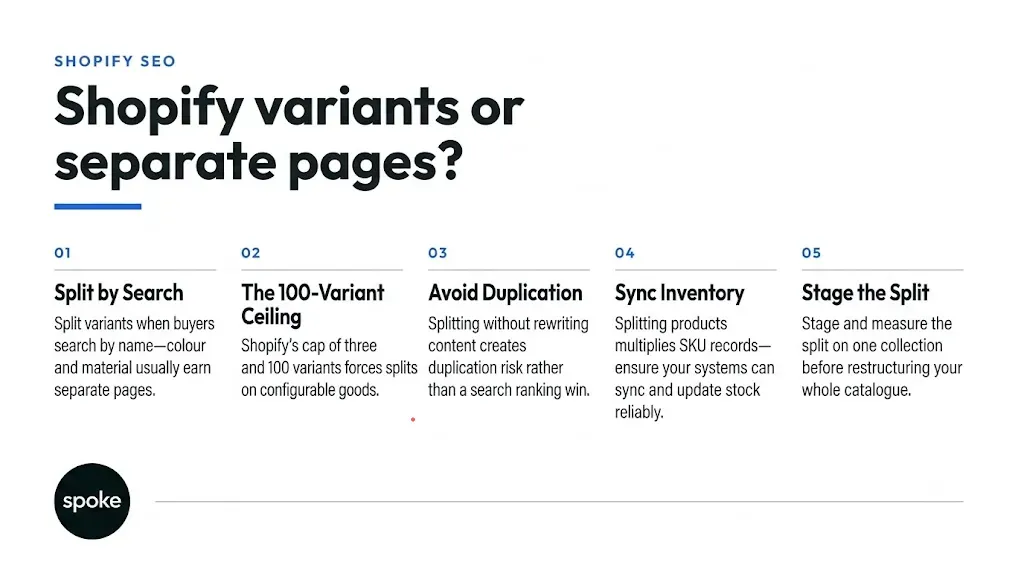
The standard heuristic holds up reasonably well: colour and material get their own page, size stays a variant. It maps to how people actually search "green velvet sofa" is a real query, "sofa size 180cm" usually isn't, because furniture sizing gets checked on the page rather than typed into a search bar. The rule breaks in three places worth knowing before you apply it store-wide.
This shows up in footwear, where "size 9 running shoes" is a genuine query pattern, not a filter applied after the decision. If your own search data shows real volume on size-qualified terms, treating size as a pure variant leaves the same opportunity on the table that colour-splitting was meant to capture.
A fastener in three material grades might need separate pages not because anyone searches by brand, but because each grade carries a different spec sheet, certification, and warranty term. The variant-versus-product call here is a documentation and liability question dressed as an SEO one. Treat it as that.
Colour drives search in UK and US fashion. In a lot of Indian apparel search behaviour, fit and fabric weight carry more of the decision than shade does. A catalogue structure copied from a US playbook can split the dimension nobody's searching for and bundle the one they are.
Shopify's own documentation on adding Shopify variants confirms a limit of three options and 100 variants per product by default, with uploads capped at 1,000 new variants a day on standard plans and no daily limit on Shopify Plus. In practice this rarely bites apparel running colour by size five colours by four sizes is twenty variants, nowhere near the ceiling. It bites configurable products: furniture with finish, fabric, and leg-height options; electronics with capacity, colour, and carrier combinations. Once your option combinations multiply past that ceiling, you're no longer choosing between shopify product variants and separate pages as a preference. The platform is chosen for you, and the question becomes how you split rather than whether.
A Google Shopping feed generally expects an entry per purchasable variant, regardless of whether that variant lives inside one product or on its own page the feed doesn't care about your URL architecture the way organic search does. Splitting changes which landing page that feed entry sends traffic to, and whether the page earns the click once it arrives.
Split a product into five colour variants with 95% identical copy, and you've recreated the duplication risk the split was meant to avoid except now these are separately indexable URLs by design, so there's no canonical tag quietly consolidating them for you.
This is exactly what combined listings apps and metafield-based grouping solve: separate product pages, each with its own URL and structured data, linked on the backend so a customer can switch colours without leaving the page and without the catalogue duplicating inventory logic five times over. The tool prevents the structural mess. It does not write the copy, and teams considering e-commerce store design work at this stage should budget writing time for every split page, not just the development.
This is the part most articles about this topic underweight, because it's an operations problem and the people writing the content don't own operations.
A single product with four variants is one record to update when stock runs low. Split it into four products and you've quadrupled the places pricing and stock need to stay correct, with nothing enforcing that they do. Run more than one Shopify store separate instances for the US, the UK, and India, say and that sync problem multiplies again, with no native mechanism keeping a stock update in one store reflected in another. This is solvable, but only if someone designs the sync process deliberately rather than assuming the split will behave like the single product it replaced.
Reviews fragment the same way. A product with a hundred reviews reads as proven. Split it into five colourways and, unless your review app aggregates across linked products, you now have five pages with twenty reviews each, looking newer and less trusted than the listing they replaced.
Check whether your review platform supports aggregation before you commit to a split structure. On mobile, splitting by colour actually helps the customer land on the exact item they searched for instead of hunting a swatch row but only if the separate page doesn't bury a four-option size picker below three thousand words of SEO copy written for the colour keyword.
|
Approach |
Variant structure & URL |
SEO opportunity |
Operational cost |
When this makes sense |
|
All variants, one product |
One URL, canonical consolidates all variants |
One ranking opportunity per product |
Lowest one SKU record set to maintain |
Under 50 products, or size-only variation |
|
Separate products, manually linked |
One URL per variant, no backend link |
High, but risks duplicate content |
High sync and content managed by hand |
Rarely recommended; usually accidental |
|
Separate products, combined listings app |
One URL per variant, linked via app |
High, with distinct content per page |
Medium app dependency, less manual sync |
Mid-size catalogues wanting clean split fast |
|
Hybrid: colour split, size as variant |
Mixed colour has its own URL, size doesn't |
Targets colour search without full catalogue split |
Medium fewer new records than full split |
Apparel and home goods with clear colour intent |
|
Metafield-linked separate products |
One URL per variant, linked via theme metafields |
High, with full control over structured data |
Highest upfront dev time to build and maintain |
Enterprise catalogues with dev resource and governance |
If your catalogue sits under about fifty products, the operational cost of splitting rarely pays for itself, keep everything as variants and spend the effort elsewhere. If you sell B2B or compliance-sensitive goods, the split is driven by specification and liability requirements, not search volume, and this whole framework is secondary to that.
If you don't yet have basic inventory tooling or a documented SKU process, splitting will expose that gap faster than almost anything else you could do to the catalogue to fix the foundation first.
Say a homeware brand carries 220 products, averaging four colour variants each, as a round example. Before splitting anything, the team pulls three figures: actual search volume on colour-qualified queries from their own search console data, how the existing variant pages are performing with customers, and the inventory headcount available to manage additional SKU records. The search volume on "oak coffee table" style queries turns out real. Inventory tooling is already in place, with one person owning stock sync across two regional stores.
On that evidence, they stage the split on one collection, say forty products rather than the full 220. They measure traffic to the new pages, customer behaviour against the baseline, and whether review counts or support tickets show fragmentation. If the pilot holds for a full sales cycle, they extend the pattern store-wide. If it doesn't, the cleanup is contained to forty products instead of the whole catalogue. Reviewing results like this against comparable project examples before scaling a decision is usually cheaper than reversing one after the fact.
If your catalogue is under fifty products or your variation is mostly size, keep everything as shopify product variants and spend effort elsewhere the split won't pay for itself. If colour or material carries real, measurable search volume and your inventory system can sustain more SKU records, stage a split on one collection before rolling it out store-wide.
Larger catalogues usually need the governance and tooling a general store review won't surface on its own, which is where a proper audit run with a shopify development company in India or in-house, as long as someone owns both the SEO and the operations side earns back its cost quickly.
Most of this is a data structure decision that happens to show up in search and sales reports later. Our blog archive has more on the operational side of Shopify catalogues.
If you want a second opinion on your own structure before you commit to one, get in touch.
Q: Should we split 40 colour variants into separate products for SEO, or will it hurt our inventory management?
A: It depends on whether your inventory system can absorb the extra SKU records without manual sync work. If colour-qualified search volume is real and you already have inventory tooling in place, splitting can work well. If your stock process is already strained with one product per colour group, the sync problem usually surfaces within a few months and outweighs the ranking gain.
Q: We have 80 SKUs across 5 colours and 4 sizes. Do we create 80 products or 20 products with 4 variants each?
A: Start with 20 products, one per colour, each carrying the four sizes as variants. This follows the standard visual-versus-non-visual split, assuming size search volume is low in your category. If size-qualified search turns out to carry real weight for your products, revisit that assumption with your own search data before committing either way.
Q: Will separate product URLs fix an underperforming Google Shopping feed?
A: Not by themselves. Merchant platforms generally expect one feed entry per purchasable variant whether it lives inside one product or across several pages, so the feed structure doesn't change much. What changes is the landing page that entry sends shoppers to, and whether that page has distinct enough content to convert once they arrive.
Q: How do we keep variant data in sync across multiple Shopify stores in different regions?
A: There's no native Shopify mechanism that syncs separate store instances automatically, so this needs a deliberate inventory process, not an assumption that splitting will behave the same as one shared product did. Assign one owner for cross-store stock accuracy and review the sync method before launching a split, not after a region runs out of stock unnoticed.
Q: Will splitting variants into separate products trigger a duplicate content penalty?
A: Google doesn't penalise structure on its own, but near-identical copy across split pages can be treated as a content quality signal rather than five distinct opportunities. The risk comes from reusing the same description and images across pages, not from the split itself. Combined listings apps or metafield linking prevent the structural mess, but someone still has to write a distinct copy for each page.
Q: If we restructure now, will we lose our existing Google rankings?
A: You can preserve most ranking equity with proper redirects from old variant URLs to the new separate pages, and by keeping the content that originally ranked rather than rewriting it from scratch. The bigger risk is usually timing splitting right before a peak sales season leaves no room to recover if rankings dip temporarily during re-indexing.
Q: Can we split some products but keep others as variants?
A: Yes, and for most catalogues this is the right approach rather than an all-or-nothing call. Split where search volume data supports it and your operations can sustain the extra records, and leave the rest as variants. Revisit the decision every few months as search behaviour and catalogue size change.
Have a project in mind or want to explore how we can help your business grow?