
August 5, 2022
How to optimize SaaS Product with Product Design?
Read Full


Table of contents

Adding a page is the easy decision. It takes one meeting, one brief, one line in the sitemap. Simplifying a site is a hard decision, because someone has to agree to lose something, and in a company with sales, product and marketing all looking at the same homepage, nobody wants to be that person. So pages accumulate, not because the site needs them, but because adding is cheap and removing is expensive.
Simplify doesn't mean fewer pages. It means fewer obstacles between a visitor and the page they already need. You can simplify navigation while keeping every page live. You can add pages while making the whole site feel calmer than it did before.
The question "should we simplify or add pages" assumes those are opposite moves on the same dial, and that assumption is where most redesign briefs go wrong before the first wireframe is drawn.
What actually needs deciding is narrower: which problems require a new URL, which require a navigation feature like a mega menu or faceted filter, and which require you to delete or merge something that's no longer earning its place. Getting the b2b website structure right usually comes down to matching each symptom to the right one of those three tools, rather than reaching for "add a page" because it's the only one that avoids a difficult conversation.
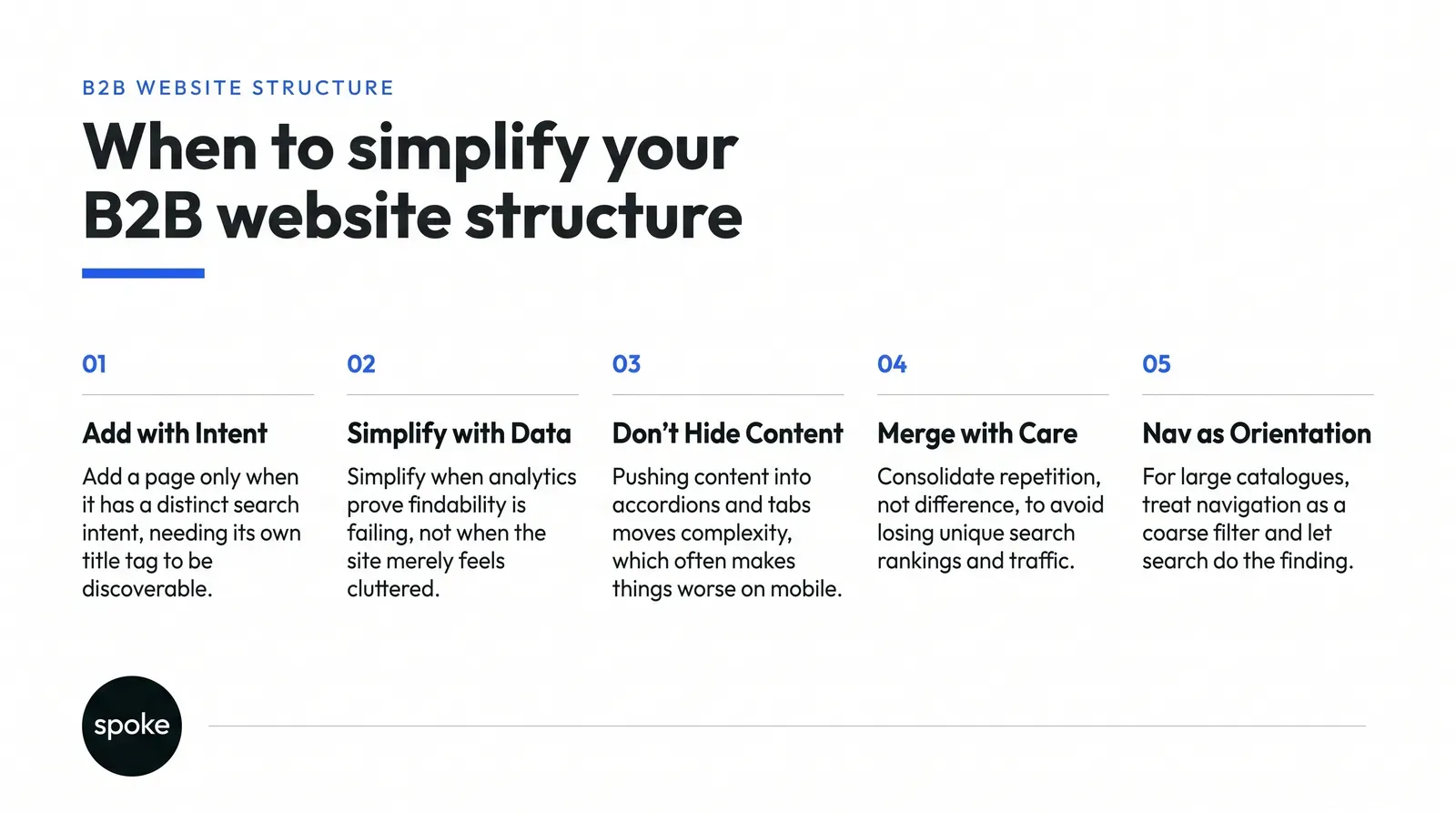
Add a page when the content serves a distinct search intent or a distinct buyer, and needs its own title tag and meta description to be discoverable in search results at all.
A page targeting "inventory management software for logistics companies" earns its existence if logistics buyers search that phrase and need content written in their vocabulary, not generic product copy with an industry name swapped in. This is also where web design scope usually gets decided whether a request is a content problem or a structure problem.
Don't add a page because a stakeholder wants their initiative represented in the main nav. That's the most common way page count grows past fifty, and its internal advocacy is dressed up as user needs. Every product manager believes their release deserves a page.
Keep "does a visitor need this to find or understand something" separate from "does this person want visibility," out loud, in the meeting, or the site ends up organised around your org chart instead of your buyer's head.
Analytics from multiple B2B sites, aggregated by firms that study buyer behaviour, show visitors overwhelmingly go straight to product and service pages, while industry-specific content gets comparatively little direct engagement even when it exists, according to analysis from Blend B2B and Grow Digital Hub.
That doesn't make industry pages worthless. It means they earn their keep through long-tail search, not through your nav, so stop trying to force fifteen vertical pages into a menu built for seven items.
Simplify when analytics prove discoverability is failing, not when the site merely feels cluttered to whoever's reviewing it. Clutter is subjective. An undiscoverable page is measurable, and you should find that measurement before you touch the structure.
Run this audit before any redesign decision:
That audit tells you whether the problem is too few pages, too many, or pages in the wrong place.
The three-click rule is nearly a quarter-century old, drawn from research on information-retrieval sites, not on B2B catalogues with thirty products and five buyer personas. If your buyers use site search, Forrester's research is unambiguous: visitors who use a site's search feature convert at two to three times the rate of those who don't. Click depth to a page matters far less than whether search surfaces the right result when someone types their problem into the box. We go through this trade-off whenever a catalogue migration work project starts turning into a navigation redesign by default.
This changes the calculation for catalogue sites. Past a certain size, you cannot fit meaningful navigation to fifty SKUs or twenty service lines into a bar with five to seven items. Forcing that fit produces mega menus nine columns wide nobody reads, or vague category names that make sense only to whoever named them. Once you're past that threshold, treat the nav as a coarse filter that gets a visitor into the right neighbourhood, and let search and faceted filtering do the actual finding, a pattern Nielsen Norman Group research has documented repeatedly for complex sites.
Hub-and-spoke works when the hub's only job is routing, and fails the moment the hub also tries to explain, sell and convert. A central "solutions" page meant to route to five spokes grows a hero section, testimonials, a comparison table and a demo CTA over successive stakeholder reviews and it stops being a hub. It becomes a destination competing with its own spokes for attention and search ranking. A visitor searching for your third solution by name lands on a hub that mentions it in one paragraph beneath four others, and leaves. We've reworked this exact failure as part of webflow design agency engagements more than once.
If you're building or repairing hub-and-spoke, keep the hub thin: one sentence of framing per spoke, a clear link, nothing more. Resist requests to add "a bit more context" that request usually comes from someone whose spoke isn't visible enough, and the fix is better routing, not a heavier hub.
Consolidating pages should merge repetition, not merge difference. Three pages making nearly the same argument to nearly the same audience should become one, nothing is lost, and a maintenance burden disappears. But three pages addressing three genuinely different buyers: IT, finance, an end-user department with different objections and vocabulary shouldn't be merged into one page that tries to speak to all three and ends up speaking clearly to none.
The honest cost sits in search. Merging three pages into one means losing three unique title tags, three meta descriptions, and three sets of long-tail keyword targets. If those pages picked up meaningful organic traffic on different terms, consolidating them can cost you that traffic. Check search console data before merging anything, not three months after launch when someone asks why organic traffic dropped. Google Search Central documentation covers how URL changes and redirects interact with ranking during exactly this kind of change.
The same logic applies to deleting pages outright. A low-traffic page may still carry inbound links from partner sites, directories or an old sales deck still circulating in someone's inbox. Delete it without a redirect to the nearest living equivalent, and you've traded a quiet page for a 404 that costs whatever link trust it held and generates a support ticket when a prospect clicks through from an old PDF. Removing a page is an SEO decision, a support decision and sometimes a sales decision, and all three owners should be in the room before it happens.
Pushing content into accordions and tabs moves the complexity, it doesn't remove it, and on mobile it often makes things worse. A long page with everything visible is at least scannable. The same content folded into six collapsed accordions looks tidy on load but asks the visitor to guess what's hidden and tap into several sections to find the one they need, with a thumb, on a small screen. The WCAG navigation guidelines are worth checking here too, since heavily collapsed content can quietly exclude visitors using assistive technology.
Use progressive disclosure for content a genuine minority of visitors need, not as a way to make an overloaded page look shorter. A reasonable test: if more than a third of visitors open a particular accordion, it isn't secondary content put it on the page by default.
Most simplification decisions are stakeholder negotiations wearing a UX decision's clothes. Sales wants every product visible because each one is a door into a conversation they know how to have. Marketing wants fewer, clearer entry points because a confused homepage converts worse on paid traffic. Support uses existing pages as a routing tool, so quietly consolidating or renaming them increases ticket volume in ways nobody notices for a month.
Legal may require certain pages to exist in a specific form regardless of the new narrative. None of these parties is wrong, they're optimising for different things, and the site has to serve all of them at once. We've seen this play out across our own redesign examples enough times to know it's rarely a design argument underneath.
The way through isn't a structure that makes everyone equally happy; that structure usually doesn't exist. It's making the trade-off explicit so the business decides it consciously. One organisation reduced its top navigation from eleven items to six and saw a sixty percent increase in overall conversion, according to a case study published by Jask Creative but that gain came with sales needing new ways to share targeted content, usually via direct links rather than nav paths. Simplification wasn't free. It had a return worth the adjustment, which is a decision for the business to make deliberately.
Picture a UK-based B2B software company with roughly thirty products split across enterprise and SMB buyers, a round, illustrative example, not a client. Their nav had grown to fourteen top-level items, one per product line, because each product owner had insisted on visibility. Analytics showed six of those fourteen pages got almost no traffic through the nav at all, despite decent organic traffic arriving via search.
The fix wasn't a rule about nav items, it was auditing which pages were orphaned. It meant consolidating three near-duplicate SMB pages into one, keeping the enterprise pages separate because the buyer and objections were genuinely different, and adding a search bar prominent enough that returning visitors stopped scanning the mega menu altogether. The nav shrank to eight items. Page count barely changed.
This is the kind of structural work that tends to happen during a wider design and build together project rather than as a standalone nav tweak.
If your catalogue is large enough that no nav can represent fifty-plus SKUs, twenty-plus service lines stop solving this with navigation alone and invest in search and faceted filtering instead. If your buyers split sharply between first-time researchers and returning power users, a structure optimised for newcomers will frustrate the people who already know what they want; a persistent shortcuts bar or a dedicated resource hub may serve them better than one shared structure. And if you're on a platform with genuinely rigid templates, it's sometimes honest to simplify the navigation and leave the underlying page structure alone, because the cost of restructuring content exceeds what the business gets back. Webflow University guidance is a useful reference for what's actually flexible to change on a given template before you commit to a direction. In all three cases, the instinct to cut the nav to five or seven items works against you.
|
Approach |
When to use it |
Impact on task completion |
Maintenance cost and SEO risk |
|
Flat-then-deep (broad categories, detailed sub-pages) |
Single product line, one or two buyer personas |
Fast for newcomers, slower for specific niche needs |
Low maintenance, stable SEO, scales poorly past 20 SKUs |
|
Hub-and-spoke |
Multiple distinct offerings needing one entry point |
Strong if hub stays thin; fails when hub tries to sell |
Moderate upkeep, risk of hub cannibalising spoke rankings |
|
Consolidated pages with progressive disclosure |
Few pages, each serving one audience with layered detail |
Good on desktop, weaker on mobile if overused |
Low page count but loses distinct title tags per merged topic |
|
Distributed architecture by audience |
Several buyer personas with genuinely different needs |
Highest task completion per persona, more for teams to maintain |
Higher cost, but preserves keyword targets and long-tail SEO |
|
Search-first structure |
Fifty-plus SKUs, catalogue too large for any menu |
Strong once buyers know search exists; weak for first-time browsers |
Depends on search quality; low SEO risk, high build cost upfront |
If you have one product line and one or two buyer personas, simplify the nav, keep pages flat, and don't overthink hub-and-spoke, a clear b2b website structure at that scale is a design decision, not a negotiation. If you're running thirty products across enterprise and SMB buyers, simplification without an audit will hide the pages earning you search traffic, and the honest answer is usually a mix: consolidate duplicates, keep genuine audience distinctions separate, and let search carry the catalogue weight your nav can't. This is where webflow web design uk decisions tend to get made badly under deadline pressure, which is exactly when an audit matters most.
If you don't yet know which of those situations you're in, that's the thing to settle first, with analytics rather than opinion. Our blog archive covers the adjacent decisions platform choice, migration timing, content ownership.
If you want a second pair of eyes on your own structure before you commit to a direction, get in touch.
Q: How do I know if my site has too many pages or not enough?
A: Check whether existing pages get organic traffic but little internal navigation traffic. That's too few routes to good content, not too many pages. If pages get neither organic nor internal traffic after a reasonable period, you likely have genuine excess. Most sites have both problems at once, which is why an audit matters more than a page count target.
Q: Should I consolidate product pages or create separate ones for each offering?
A: Create separate pages when products serve genuinely different buyers with different objections and search terms. Consolidate when pages say nearly the same thing to nearly the same audience with different headlines. Check search console data first, since merging loses each page's unique title tag and keyword targets, and that cost is sometimes larger than the maintenance saved.
Q: When should I use tabs or accordions instead of separate pages?
A: Use progressive disclosure for content a genuine minority of visitors need, not to shorten an overloaded page cosmetically. If more than a third of visitors open a given accordion, that content isn't secondary and belongs on the page by default. On mobile especially, hidden content is often simply missed rather than found later.
Q: How do I handle multiple buyer personas without duplicating pages?
A: Distinguish between content that genuinely differs by buyer (objections, proof points, vocabulary) and content that's merely labelled differently. Keep the first set separate; merge the second. A distributed architecture by audience costs more to maintain but preserves the distinctions a single consolidated page would erase.
Q: What happens to SEO when I merge pages or restructure navigation?
A: Merging pages loses the unique title tag, meta description and keyword target each page holds, which can cost long-tail organic traffic even as the site becomes easier to maintain. Removing a page without a redirect to a living equivalent creates a 404 that damages both rankings and user trust, so redirects aren't optional during any consolidation.
Q: Do B2B visitors actually use mega menus, or do they go straight to search?
A: Visitors who use site search convert at two to three times the rate of those who don't, according to Forrester research, which suggests search carries more weight than menu depth on sites with real catalogue complexity. Mega menus still matter for first-time visitors orienting themselves, but past a certain catalogue size, search becomes the primary tool, not a backup.
Q: How do I know if simplifying navigation is helping or hurting conversions?
A: Compare conversion results and page depth before and after the change, alongside support ticket volume, since hidden or renamed pages often increase queries that analytics alone won't show. One documented case reduced top navigation from eleven items to six and saw a sixty percent rise in overall conversion, but that gain required sales to adopt new routing methods outside the nav.
Have a project in mind or want to explore how we can help your business grow?